Azure Resource Group
An Azure Resource Group is a container used to manage and monitor all application resources.
For Make Provisioning, an Azure Resource Group is created to hold all relevant resources. These resources are described in more detail in the following sections.
Naming Convention
The Azure Resource Group is named according to a defined naming convention. This could be your own or one provided by Rapid Circle.
By default, the Rapid Circle naming convention for Azure Resource Groups is:
| Naming Convention | Description |
|---|---|
| Format | <DEPT[2|4]>-RG-MAKE-PRV-<ENVIRONMENT[2|4]> |
| Example | RC-RG-MAKE-PRV-DEVRC-RG-MAKE-PRV-TSTRC-RG-MAKE-PRV-DEMO |
Permissions
When installing Make Provisioning, the user account must have permission to either:
- Create a Resource Group (and thus become Owner), or
- Hold the Owner role for an existing Resource Group.
Resource Group Structure
After installing Make Provisioning, the Resource Group appears as shown below:
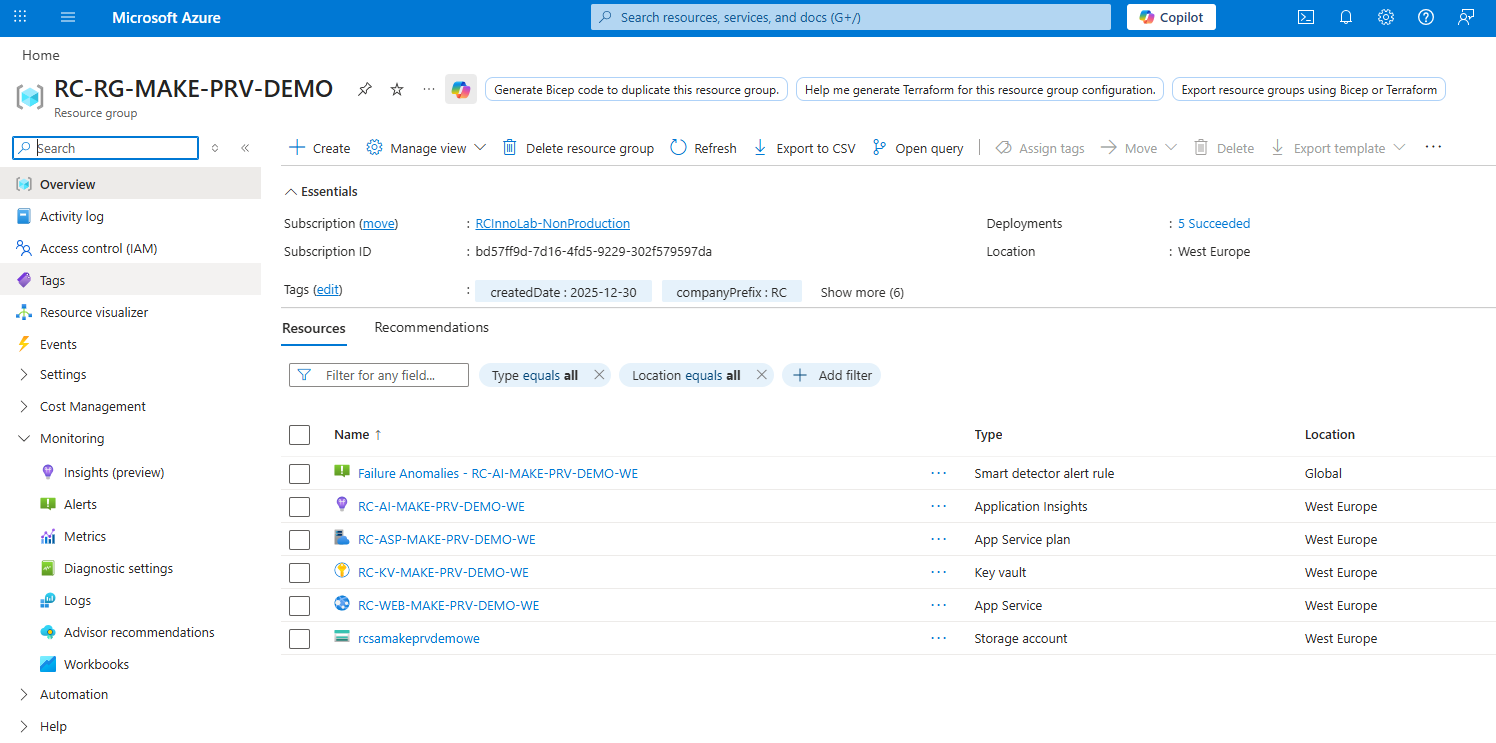
Tags
The Resource Group also has several Tags applied. These tags can be used for filtering and organising resources within the Azure Portal.