Make Provisioning Architecture
This document outlines the high-level architecture for the Make Provisioning system, which relies on Azure services for application logic and a SharePoint site for configurations and queue management.
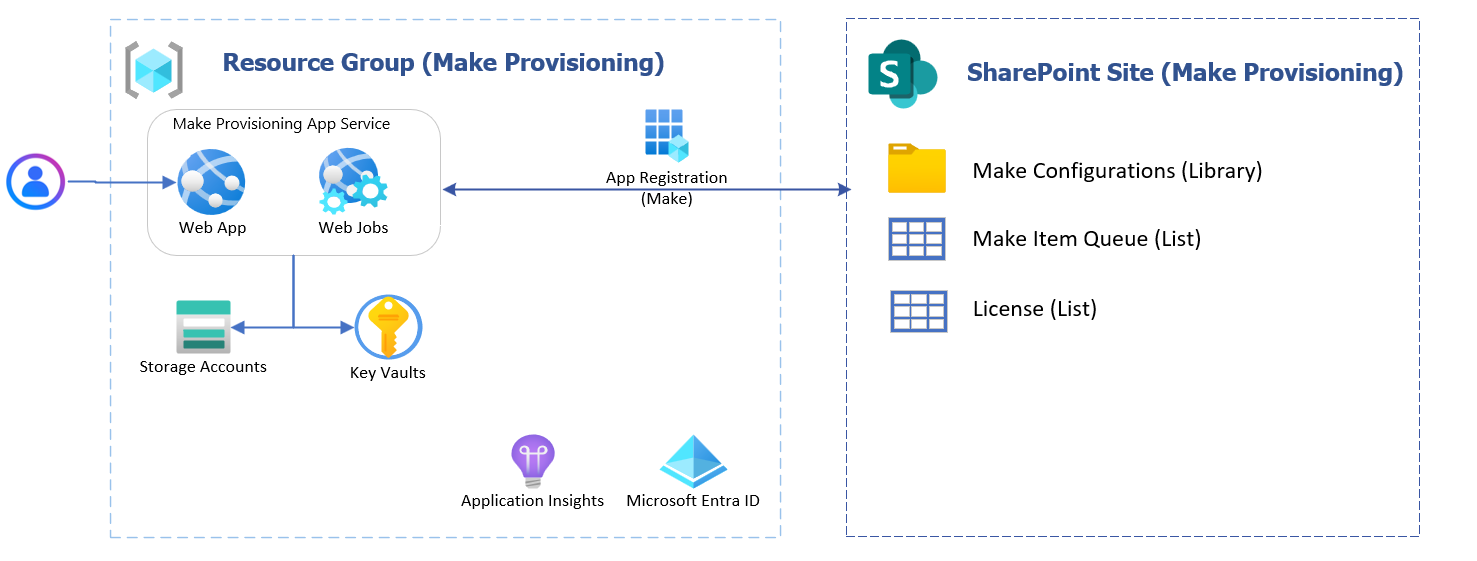
Figure 1 : Architecture Design
1. Overview
The system is divided into two main parts:
- An Azure Resource Group that contains the application’s compute and security components.
- A SharePoint site that stores configurations, process data, and queues.
2. Azure Components
This group contains the application’s processing elements and security boundaries.
Component Overview
| Component | Description | Interaction |
|---|---|---|
| Make Provisioning App Service | Hosts the application, which is split into two parts. | Receives user requests and interacts with all other components. |
| Web App | The user-facing portal that triggers provisioning tasks. | Uses other Azure components and SharePoint. |
| Web Jobs | Background workers or scheduled tasks that perform the provisioning. | Processes items from SharePoint queues and uses stored secrets. |
| Key Vaults | Secure storage for credentials and connection strings. | Web App and Web Jobs retrieve secrets from here. |
| Storage Accounts | Persistent storage for data, logs, and artifacts. | Used by both Web App and Web Jobs. |
| Application Insights | Monitoring and diagnostics for performance and health. | Collects telemetry from Web App and Web Jobs. |
| Microsoft Entra ID | Identity, access management, and the App Registration used for SharePoint access. | Secures all Azure components and enables authentication. |
3. SharePoint Components
This site stores configurations and provisioning data so updates can be made without deploying new code.
Components
| Component | Type | Description |
|---|---|---|
| Make Configurations | Library | Stores configuration files, templates, and rules for provisioning. |
| Make Item Queue | List | Holds individual provisioning requests for Web Jobs to process. |
| License | List | Contains license data or files used by the provisioning logic. |
4. Integration
User Flow
- A user initiates an action through the Web App.
- The App Service authenticates to SharePoint using an Microsoft Entra ID App Registration.
- The application reads configurations from SharePoint and processes queue items.
- Web Jobs pick up items from the SharePoint queues and carry out provisioning tasks.
Authentication and access to SharePoint are handled through the App Registration (Make), secured by Microsoft Entra ID.